Let's Create Together
Available for freelance projects, consulting opportunities, and full-time positions. Let's create accessible, data-driven digital experiences that make a real impact.
+44 7444148652 | +91 7303010238
© 2026 Vedant Khandelwal • UX Designer
ABOUT
TASK
SOLUTION
KEY FEATURES
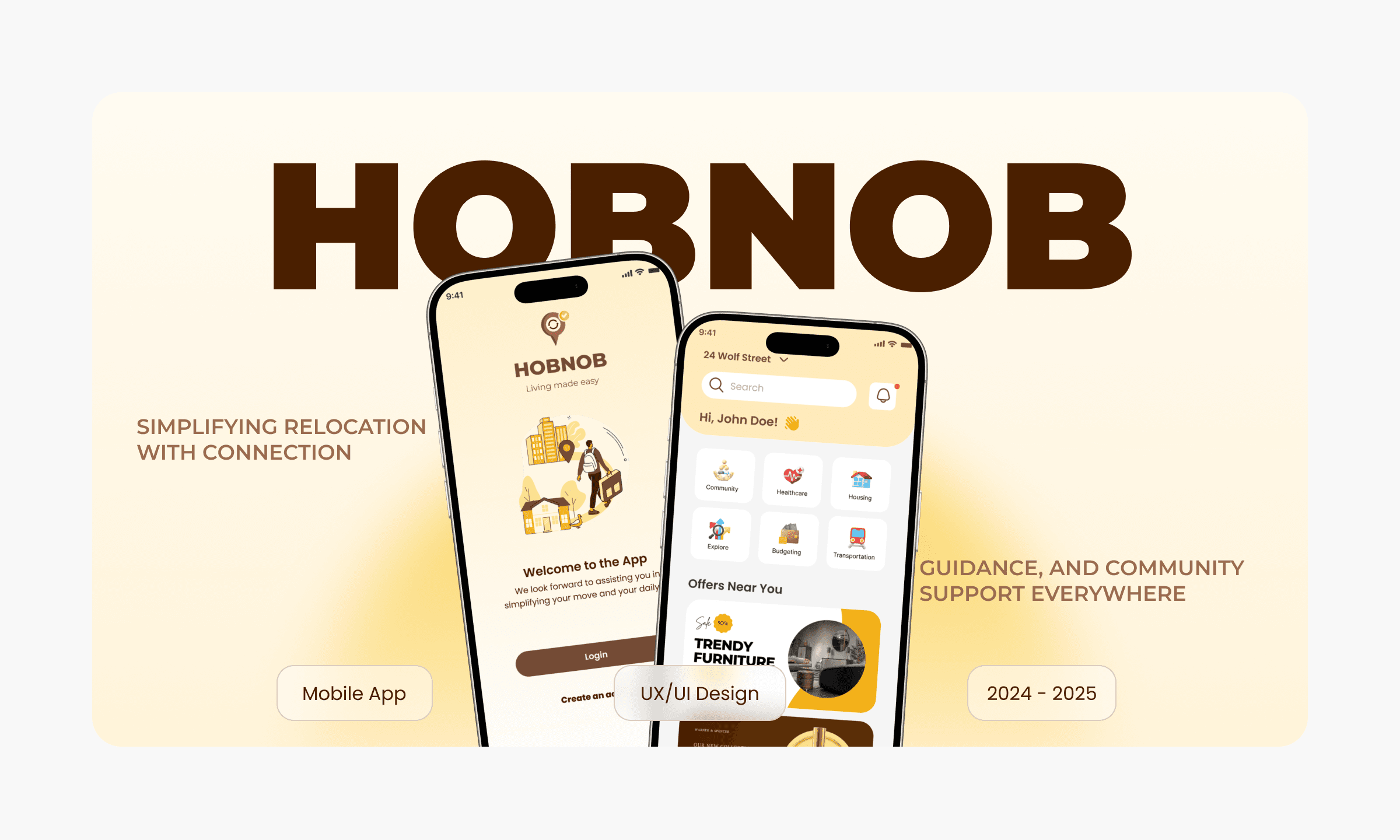
Hobnob is a thoughtfully designed app aimed at simplifying the relocation process for international students and employees. It acts as a comprehensive solution to help users adapt to their new environment by addressing key aspects of their transition, such as housing, healthcare, exploration, budgeting, transportation, and community support.
Hobnob aims to support individuals relocating to new cities by streamlining the process of finding information, resources, and social connections.
Hobnob offers a centralized digital platform that delivers personalized recommendations, structured local information, and tools for making social connections, all tailored to the user’s needs.
The app includes curated guides for housing, healthcare, and transportation, a friend-matching community forum, budgeting tools, and access to exclusive local deals, making relocation smoother and more welcoming.
PROBLEM
Relocating can be overwhelming due to scattered information, cultural barriers, and difficulty in building a local network, often leaving newcomers feeling isolated and uncertain.
Context
My Role
Strategy
🔭
Personas
👤
User Flows
🔀
Usability Testing
🧪
Iteration
🔁
Insights
📊
Prototyping
🎛️
Wirframes
🧱
Interaction
🧩
UI Design
🎨
Design System
📊
Discovery
🔎
Ideation
🧠
Interviews
🗣️
Information Architecture
🧾
Surveys
📝
Product Direction
🧭
Journey Map
🗺️
In the Hobnob project, I played a comprehensive end-to-end design role. I led the user research phase, conducting interviews and surveys to uncover relocation challenges and user needs. I developed user personas, mapped user flows, and crafted the app’s logo, wireframes, and overall visual identity.
My responsibilities extended to designing the complete UI/UX, ensuring accessibility and clarity throughout, and running usability testing to validate and refine the final experience. This holistic involvement allowed me to shape Hobnob into a user-centred, intuitive solution from concept to delivery
Impact
Over 14 weeks, Hobnob was shaped into a centralized relocation companion that reduces stress from fragmented information by bringing housing, healthcare, transport, budgeting tools, and community support into one guided experience for newcomers (international students and employees)
Timeline
Week 1–3 research, Week 4–5 information architecture, Week 6–7 wireframes, Week 8–10 UI design, Week 11–12 prototyping, and Week 12–14 user testing to validate and refine the end-to-end flow.
Week 1 - 3
Week 8 - 10
Week 11 - 12
Week 12 - 14
Week 4 - 5
Week 6 - 7
Research
Information Architecture
Wireframes
UI Design
Prototyping
User Testing
Project timeline
I used an end-to-end user-centred design (UCD) process, moving from discovery research into structured definition and iterative design, then validating through usability testing and refinement.
Design Process
Discovery & research
Design & iterate
Define
Validate
Surveys + open-ended interviews to uncover relocation pain points and needs.
Wireframes → prototypes (low to high fidelity) and UI design/design system work, iteratively refined based on feedback.
Persona development, journey mapping, user flows, and information architecture to structure the product around real user contexts.
Usability testing and refinement to improve the final experience (e.g., UI tweaks informed by testing).
🔍
🛠️
🧭
✅
Development Process
The development of Hobnob followed a rigorous user-centred design approach using the following methods:
Surveys & Open-Ended Interviews
User Journey Mapping
Testing & Refinement
User Persona Development
Validate
Identified key relocation pain points by gathering insights from international students and relocated employees.
Mapped out the typical journey of relocating individuals from pre-move planning to post-settlement adaptation.
Conducted usability testing with real users, incorporating feedback like larger doctor/GP images into the final design.
Developed concise profiles of target users like international students (housing, social) and professionals (relocation needs).
Designed and iteratively refined prototypes (low to high fidelity) based on user feedback from testing.
📝
🗺️
✅
🧑🤝🧑
📱
The Solution
Feature 1
Smart Event Discovery
Personalized event recommendations based on user interests, location, and social connections. Advanced filters and smart suggestions help users find the perfect events without endless scrolling.
Location-Based Search
Discover events happening nearby with interactive map view and proximity filters
Interest Matching
AI-powered recommendations based on your activity history and preferences
Social Filtering
See which events your friends are attending or hosting with one tap
Feature 2
Instant RSVP & Calendar Sync
One-tap RSVP system with automatic calendar integration. Users can manage all their events in one place with smart reminders and schedule conflict detection.
Quick RSVP Options
Going, Maybe, or Can't Go with customizable visibility settings
Auto Calendar Sync
Seamless integration with Google Calendar, Apple Calendar, and Outlook
Smart Reminders
Contextual notifications with travel time estimates and weather updates
Feature 3
Group Chat & Coordination
Built-in messaging for event attendees to coordinate plans, share updates, and connect before the event. Hosts can send announcements and manage RSVPs effortlessly.
Event Chat Rooms
Private group chats for confirmed attendees with rich media sharing
Host Announcements
Broadcast important updates to all attendees with read receipts
Attendee Coordination
Plan carpools, share photos, and coordinate logistics in real-time
Feature 4
Event Analytics Dashboard
Comprehensive insights for event hosts showing RSVP trends, attendance predictions, and engagement metrics. Data-driven tools help optimize event planning and improve turnout.
RSVP Tracking
Real-time response rates with conversion funnels and dropout analysis
Engagement Metrics
Track views, shares, and interactions to measure event popularity
Attendance Predictions
AI-powered forecasts based on historical data and current trends
Competitors Analysis
This competitive analysis benchmarks Hobnob against leading relocation support, expat community, and local discovery platforms to understand how newcomers in the UK currently piece together information, logistics, and social connection. Hobnob differentiates by combining curated local resources, guided relocation flows, and community support in one experience—reducing the friction of switching between multiple tools during the move and settlement journey.
Company/ app name
Relocity
InterNations
Expatica
Meetup
Hobnob (concept)
Indirect (expat community)
Indirect (expat info portal)
Indirect (social discovery)
Conceptual Product
Limited
Limited
No
Strong (interactive checklists + onboarding)
Medium (service listings)
Medium–Strong (guides/directories)
No
Strong (curated guides + directories)
Strong (community + events)
Medium (content/community ecosystem)
Strong (interest-based groups/events)
Strong (forum + friend matching)
Direct (relocation platform)
Strong
Strong
Limited/unclear
Structured relocation support and curated/local guidance.
Great for meeting people and joining expat networks.
Trusted how-to information for expat life and local systems.
Fast way to build a social circle through local events.
“All-in-one relocation companion” combining guidance + resources + social support.
Guided relocation (checklists/onboarding)
Local resource directory (housing/healthcare/transport)
Community / networking
Notes (why users pick it)
Type
University/Employer-sponsored (B2B2C) — more profitable early-stage
B2C — can be profitable later, but harder to scale
Profitability: B2B2C vs B2C
Go-to-market / Monetization hypothesis
Revenue model
Annual/semester contracts paid by the institution (often bundled with wellbeing, international office, HR, or relocation support).
💷
Revenue model
Subscription/freemium/affiliate commissions (housing, SIM, transport, local deals).
💳
Best for Hobnob
Fits “checklists + curated directories + community support,” helping reduce overwhelm and support load.
🧩
Best Use
A companion channel after B2B traction, or an upsell tier for graduates/family movers outside partner institutions.
🔁
Why it wins
Faster reach (one deal = thousands of users) + recurring revenue with clearer ROI (reduced support tickets, smoother onboarding, stronger retention/engagement).
🚀
Challenge
Higher marketing spend and stronger differentiation needed to beat “free” alternatives (Google, forums, community/event apps), leading to slower payback.
📣
Pitch order
Institution-Specific Positioning
Pilot Institutions
University of Leeds (flagship anchor)
University of Leeds
Leeds beckett
Leeds Beckett (fast pilot)
Subscription/freemium/affiliate commissions (housing, SIM, transport, local deals).
“Reduce fragmented information + improve arrival/onboarding experience for a large international cohort with one guided experience and local directories.”
“A lightweight layer over existing support—centralize journeys, checklists, and community touchpoints so students know what to do next and where to go for help.”
Their International Arrivals Guide highlights dedicated support teams (advice, immigration support, accommodation guidance), making it easier to position Hobnob as a “single front door” to reduce confusion and repeat queries.
1
2
User Surveys and Interviews
The target users are professionals and international students facing challenges like cultural adjustment, language barriers, and navigating new cities, who need personalized support to settle, connect, and thrive in their new environment.
User interviews and surveys for Hobnob aimed to identify relocation challenges, user needs for local info, and social connection barriers.
Find common relocation pain points
Identify valuable resources for users
Understand preferred ways to connect locally
Main Goals
🧑🏻🦱
Alex Periera
Occupation:
Software Engineer
Busy weekday routine and time-constrained lifestyle; prioritizes efficiency, quick decision-making, and building a social circle outside work while settling into a new city.
Lifestyle:
Settle quickly, build a local network, and find affordable housing; needs clear guides to local services, social opportunities, and personalized housing recommendations.
Goals & Needs:
Navigating unfamiliar systems and overcoming cultural isolation.
Challenges:
Wants a fast, low-friction transition that helps him feel socially connected and confident in day-to-day decisions (housing + local services).
Motivation:
29, Male
Occupation:
University student
Adjust to academic life, make friends, and manage finances; needs language support, budgeting tools, and access to student communities.
Goals & Needs:
Language barriers, adapting to new teaching styles, and finding affordable accommodation.
Challenges:
Wants to feel independent and “settled” early—socially integrated, financially in control, and comfortable navigating university life.
Motivations:
Campus-centred lifestyle; balances classes, exploring the city, and socializing, while staying budget-conscious and relying on student communities for support.
Lifestyle:
21, Female
👩🏻
Jenny Xiang
Target audience’s opinion on wanting to use an app with the proposed features
yes
maybe
no
Challenges faced by newcomers
Respondents who found housing
Healthcare
Other factors
Community support
Source of finding housing, healthcare, and community support after relocating
Local recommendations
Exploration
Dedicated apps
Community support
DESIGN SOLUTIONS FROM USER SURVEYS AND INTERVIEWS
🌟
User interviews showed that newcomers struggled to find trustworthy local information. Hobnob addresses this with curated city guides and resource directories covering housing, healthcare, and services.
Trusted Local Info
🌟
Many users found it hard to build social connections in a new city. To solve this, Hobnob offers a community forum and friend-matching features to connect users with similar interests.
Social Connections
🌟
Relocation logistics often felt overwhelming and confusing for users. Hobnob introduced interactive checklists and personalized onboarding flows to simplify the moving process step by step.
Guided Relocation Steps
🌟
These solutions directly respond to user needs, making relocation smoother, more supported, and socially engaging through clear guidance and community connection.
Smoother Relocation
User Journey Mapping - Jenny Xiang (Student)
Jenny is a 21-year-old international student starting university in Leeds who wants to adjust to academic life, make friends, and manage her finances; she faces language barriers, adapting to new teaching styles, and finding affordable accommodation.
She needs language support, budgeting tools, and access to student communities.
Emoji key (for your legend): 😰 Overwhelmed | 😟 Anxious | 😐 Neutral | 🙂 Settling in | 😄 Confident
PERSONA SNAPSHOT
Stage
Pre-move planning
Arrival week
First 2–4 weeks
Ongoing adaptation
Airport → transport, essentials (SIM, groceries), local navigation.
Campus communities, student groups, budgeting.
Healthcare/services, exploring city, recurring expenses.
Settle quickly; reduce anxiety; reach accommodation safely.
Make friends; manage money; build a routine.
Feel confident and connected; access support when needed.
Overwhelming steps; unfamiliar systems; language friction.
Hard to build connections; budget pressure; adaptation stress.
Doesn’t know support options until a problem appears.
University site/emails, Google, group chats.
😐
😰
😟 → 🙂
😄
Secure accommodation; plan budget; feel prepared.
Scattered info; hard to judge what’s trustworthy.
“I don’t know what to trust or what to do first.”
“Everything feels confusing in the first few days.”
“I want friends, but I don’t know where to start.”
“I only search for help when something goes wrong.”
Compares housing; collects “must-do” tasks; estimates monthly spend.
Navigates city; sets up essentials; tries to understand the area.
Joins communities; looks for events; tracks spending.
Uses directories for services; explores; maintains budget.
Personalized onboarding + housing guide; budget setup; pre-departure checklist.
Step-by-step arrival checklist; transport + essentials directory; “near me” recommendations.
Friend matching + community forum; student events; budgeting insights + local deals.
GP/healthcare finder + trusted directories; timely prompts/reminders tied to journey progress.
Key touchpoints
Goals
Pain Points
Actions
Hobnob opportunities
Quote (for the map)
Emotion
User Interaction Flow
The target users are professionals and international students facing challenges like cultural adjustment, language barriers, and navigating new cities, who need personalized support to settle, connect, and thrive in their new environment.
1
Personalized On-boarding
Creating a tailored user experience by collecting key information about relocation time-frame, destination city, visa status, and understanding the app's recommendations and resources.
2
Local Resource Directory
Integration of verified local information about housing options, healthcare facilities, transportation, and essential services with reviews and ratings from other relocators.
3
Community Connection & Interactive Checklists
Enabling users to connect with others who have similar backgrounds or are in the same area, facilitating meetups, information sharing, and building social networks in new locations.
Developing customized to-do lists based on users' specific situation, guiding them through the relocation process while providing timely reminders and guidance.
4
Budget Management & Cultural Integration
Helping users plan and track relocation expenses, compare cost of living, and find special deals with local service providers through the app.
Providing resources like language basics, local customs, and cultural norms to help users adapt to their new environment and reduce culture shock.
Information Architecture
This information architecture ensures users can intuitively find what they need, complete relocation tasks efficiently, and feel supported and connected throughout their journey
Login
On-boarding
Home
Housing
Community
Find Friends
Accommodations
GP Finder
Charity stores
Public transport
Budget planner
Social Forum
Home essentials
Hosp & clinics
Sight seeing
Ride services
Finance guide
My neighbourhood
Groceries
Pharmacies
Restaurants
Cycling routes
Clubs & Orgs
Repairs & services
Ambulance
Shopping
Walking trails
Support groups
Self storage
Petcare
Entertainment
Driving
Currency converter
Events
Utilities
Food services
Daycare
Outdoor activities
Community events
Culture & lifestyle
Fitness centres
Travel planning
Deals & discounts
Healthcare
Explore
Transportation
Budgeting
Taxes
Savings
Typography
I chose Poppins for Hobnob because its clean, modern design enhances readability and gives the app a fresh, professional look. Its versatile weights and multilingual support make it ideal for clear, consistent UI across all screens, perfectly reflecting Hobnob’s user-friendly and contemporary brand.

Aa
Aa Bb Cc Dd Ee Ff Gg Hh Ii Jj Kk Ll Mm Nn Oo Pp Qq Rr Ss Tt Uu Vv ww Xx Yy Zz
1 2 3 4 5 6 7 8 9 0 ‘?’ “!” (%) [#] {@} / & \ < - + ÷ × = > © ₹ $ € £ : ; , . *
Regular
Semibold
Bold
Colour Palette
The warm and earthy color palette used in Hobnob—featuring tones like F8BD00, 744B36, and FFEABB—creates an inviting and user-friendly experience by evoking feelings of comfort, warmth, and approachability. These colors not only make the interface visually appealing and easy on the eyes, but also reflect Hobnob’s core values of support, friendliness, and helping users feel at home as they settle into new environments.
Soft cream
Golden yellow
Rich brown
Hex: FFEABB
RGB: 255 234 187
Primary
Hex: F8BD01
Hex: 744B36
RGB: 116 75 54
RGB: 248 189 1
Additional
Accent
UI Kit
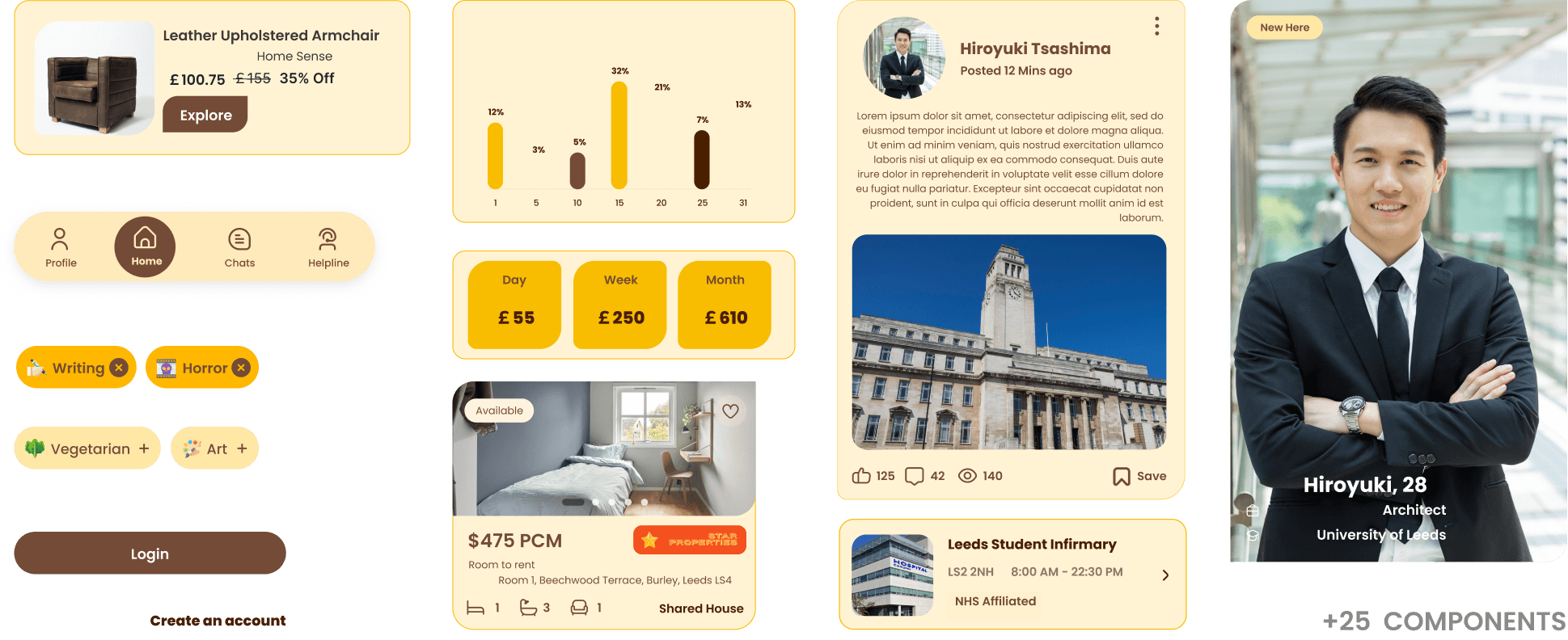
The UI kit for Hobnob is built around consistent, user-friendly, and visually appealing components such as buttons, input fields, and icons. Its reusable design elements ensure a cohesive look throughout the app, making navigation intuitive and the overall experience both aesthetically pleasing and accessible for all users.
UI Designs
Onboarding & Welcome
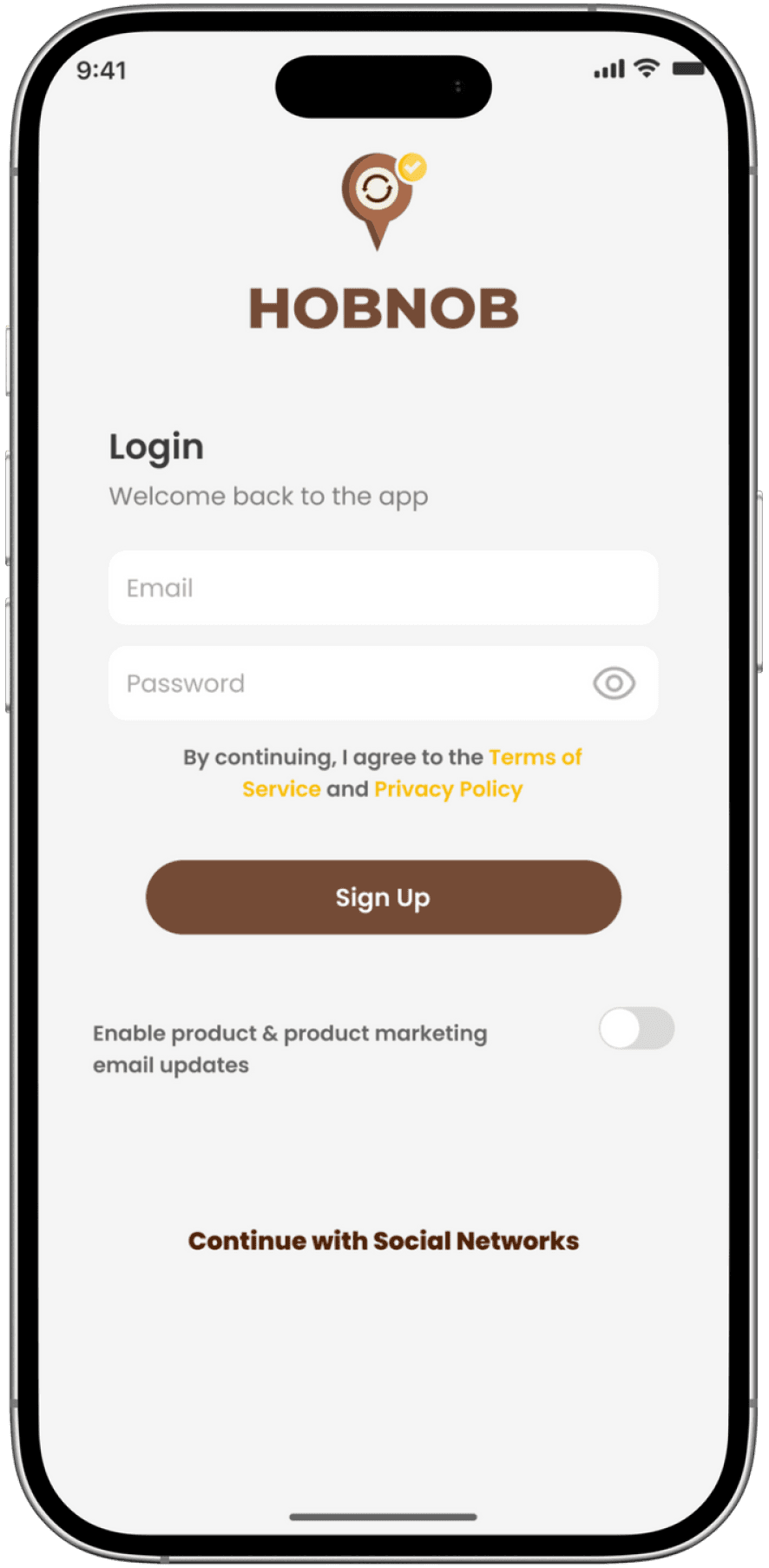
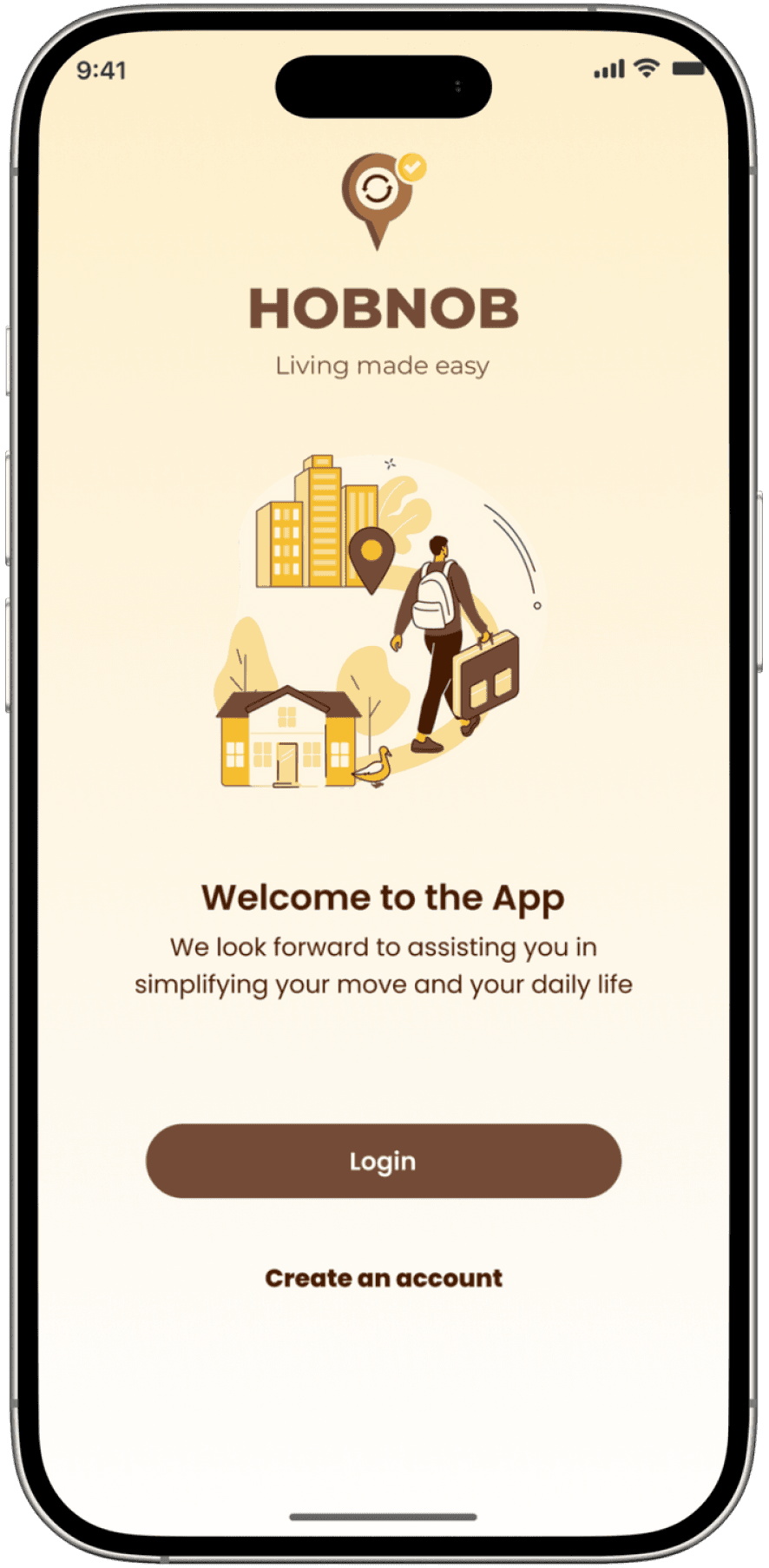
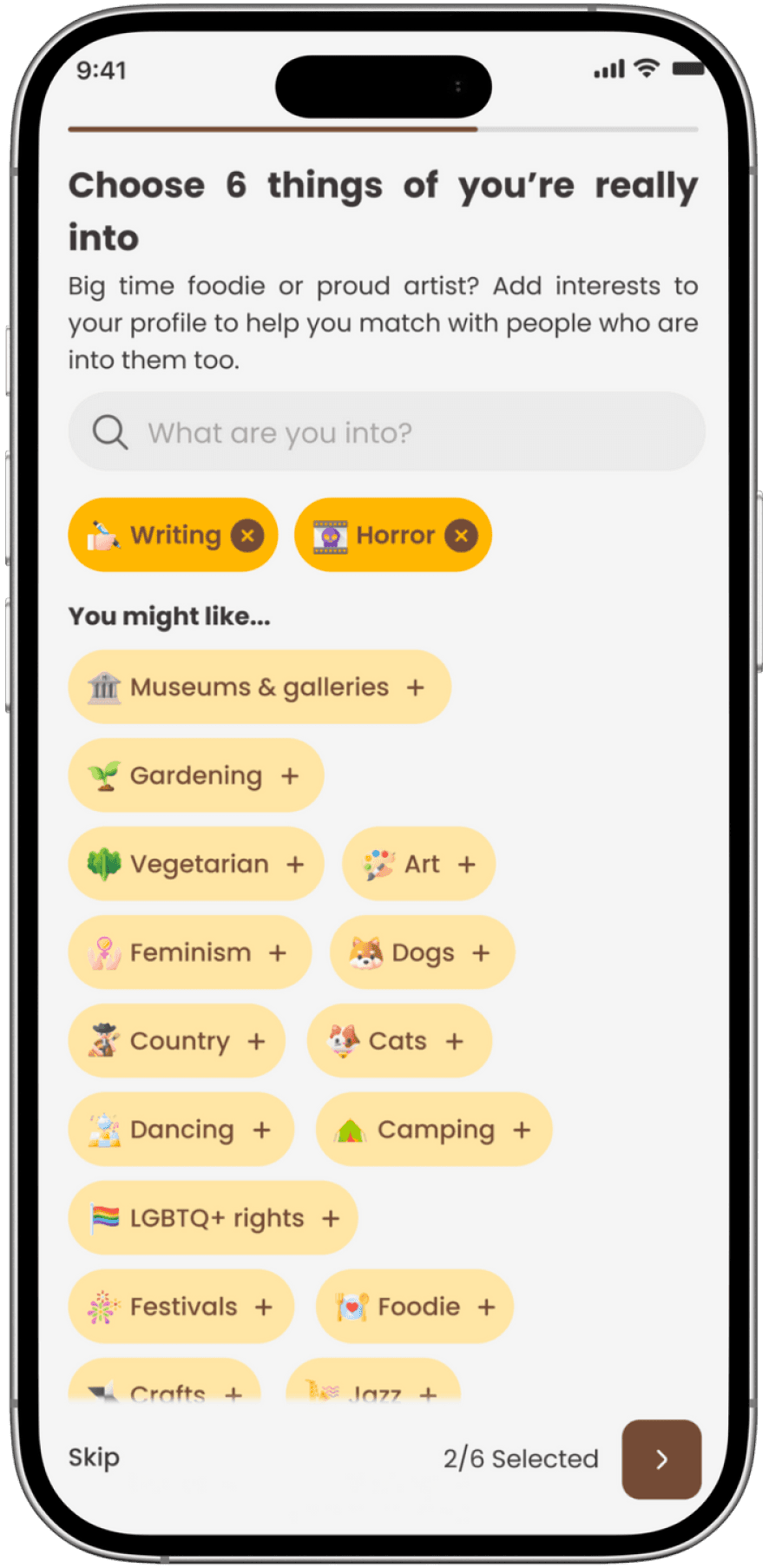
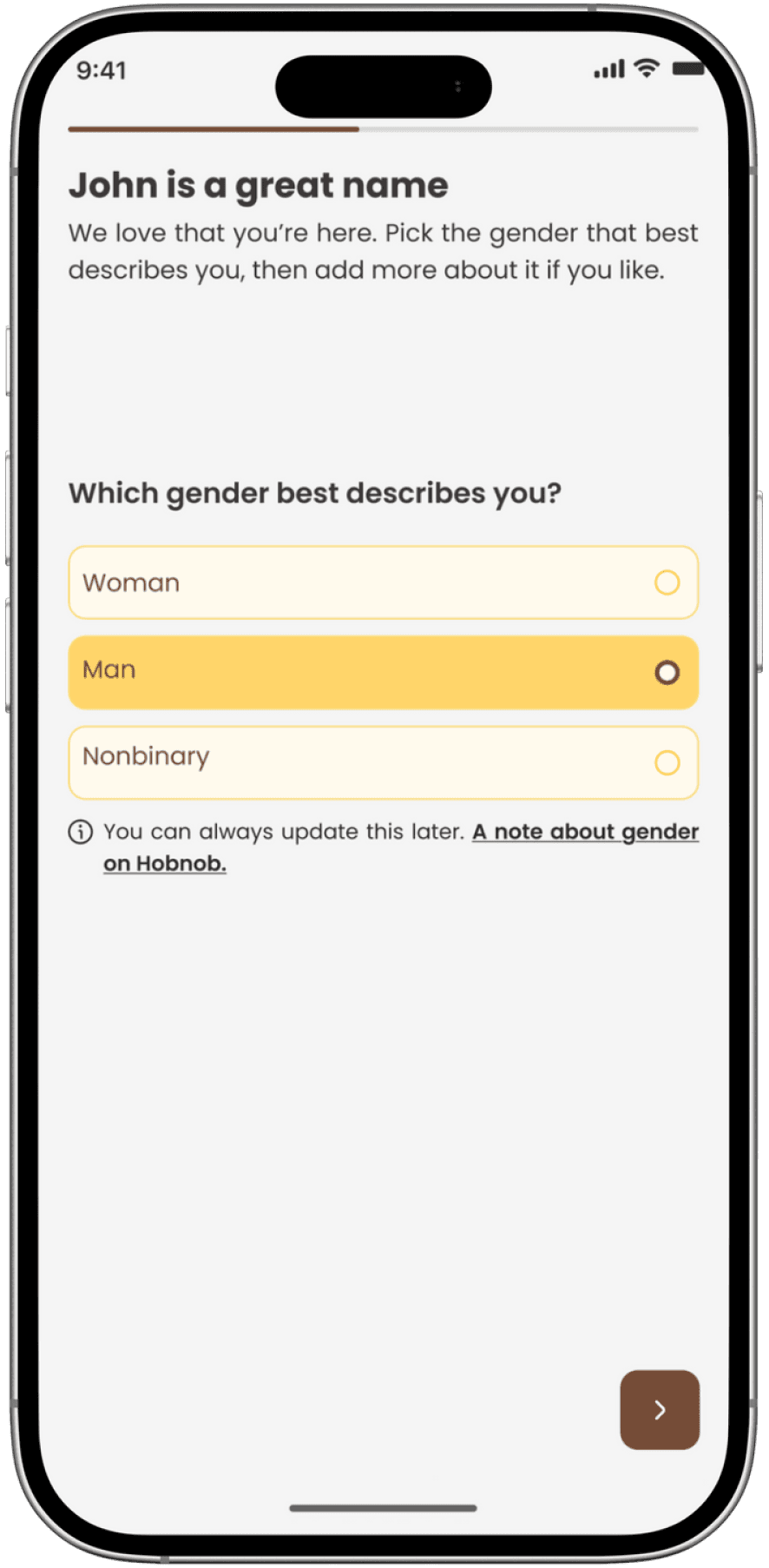
For Hobnob’s onboarding and login, users can sign up quickly using their email, social handles, or phone number, ensuring a frictionless start. The onboarding flow is designed to be concise yet comprehensive, gathering essential information about users’ interests, demographics, and preferences to personalize their experience from the outset
01
This approach not only streamlines access but also allows the app to tailor recommendations, community connections, and resources to each user’s unique profile. By keeping the process simple and user-friendly, while collecting relevant details, Hobnob ensures users feel welcomed, understood, and engaged right from their first interaction
Home Dashboard
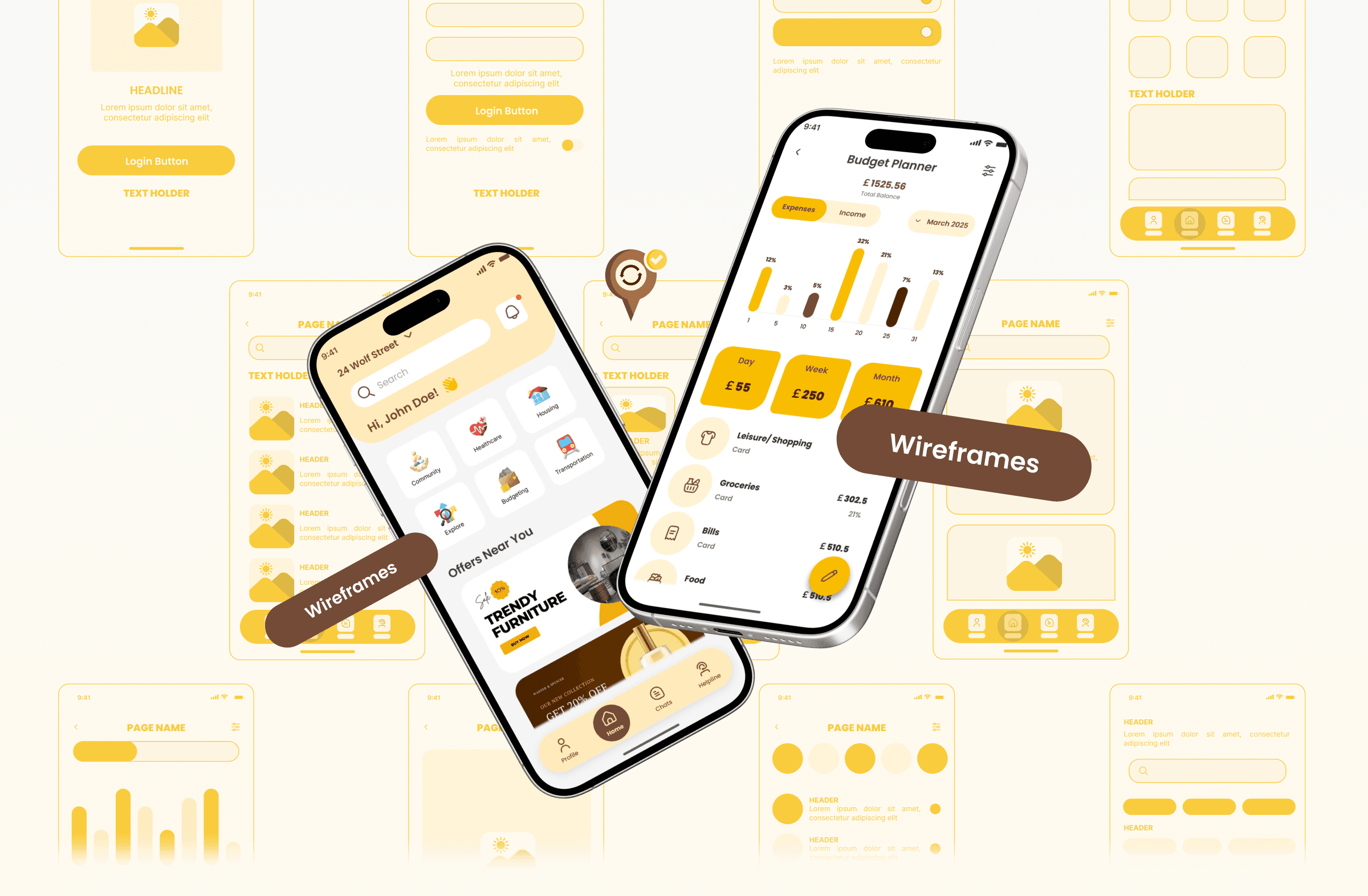
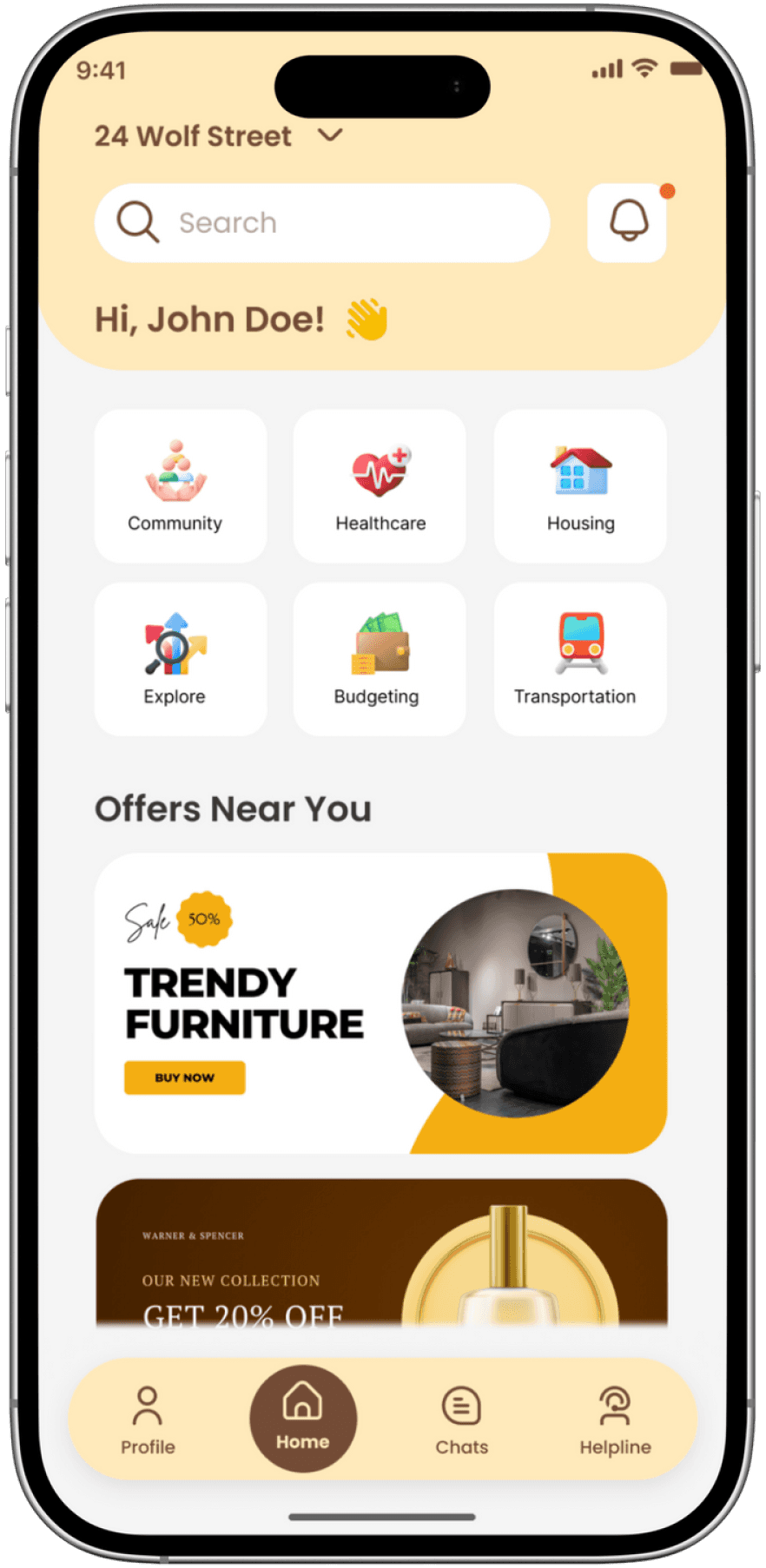
The Hobnob homepage offers a friendly, personalized welcome with quick access to key features like Community, Healthcare, Housing, and more. A search bar and location details make navigation easy, while curated local offers and a clear bottom menu ensure users find what they need effortlessly. The clean layout and warm colors create a comfortable, inviting experience.
02
Resource Directory & guides
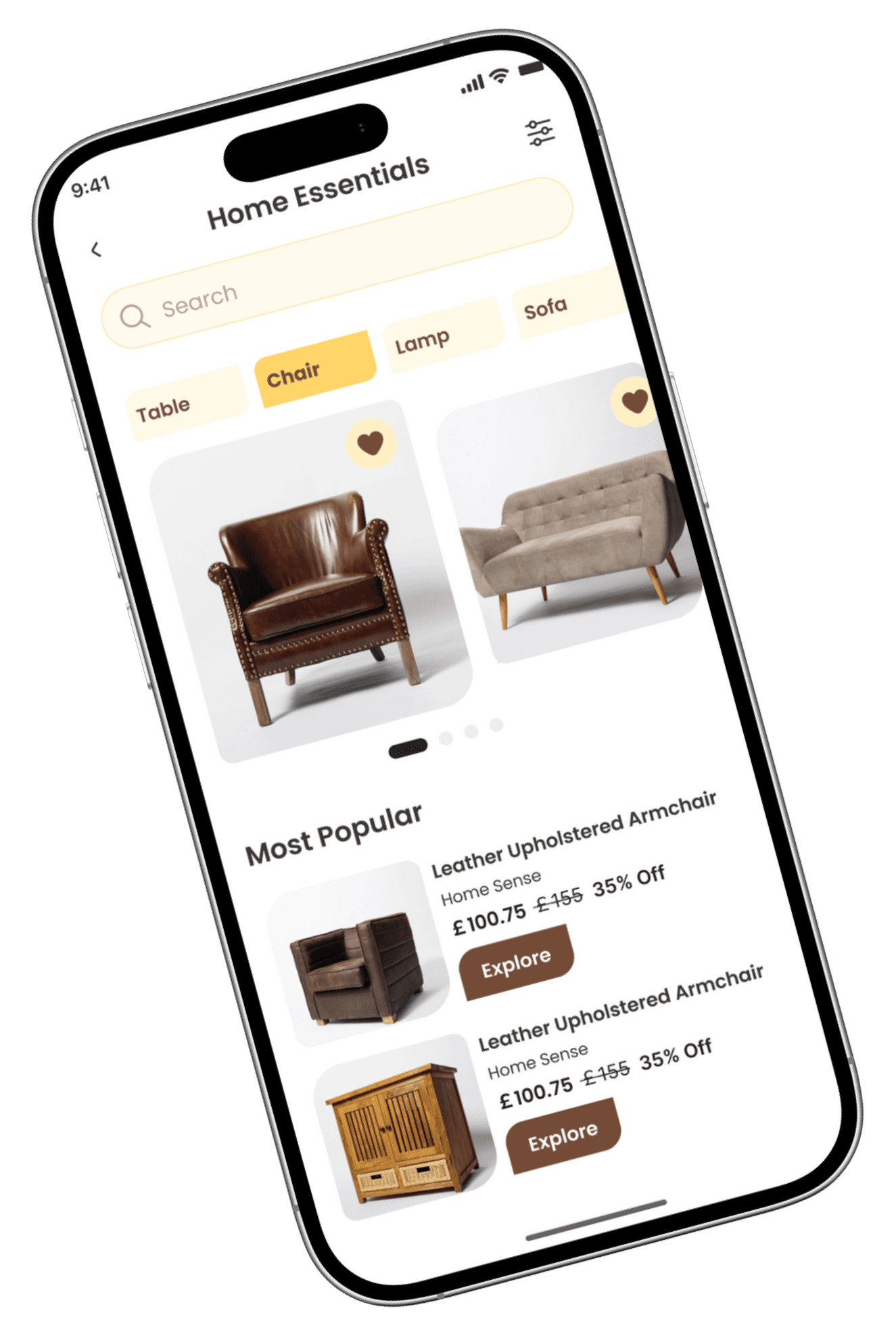
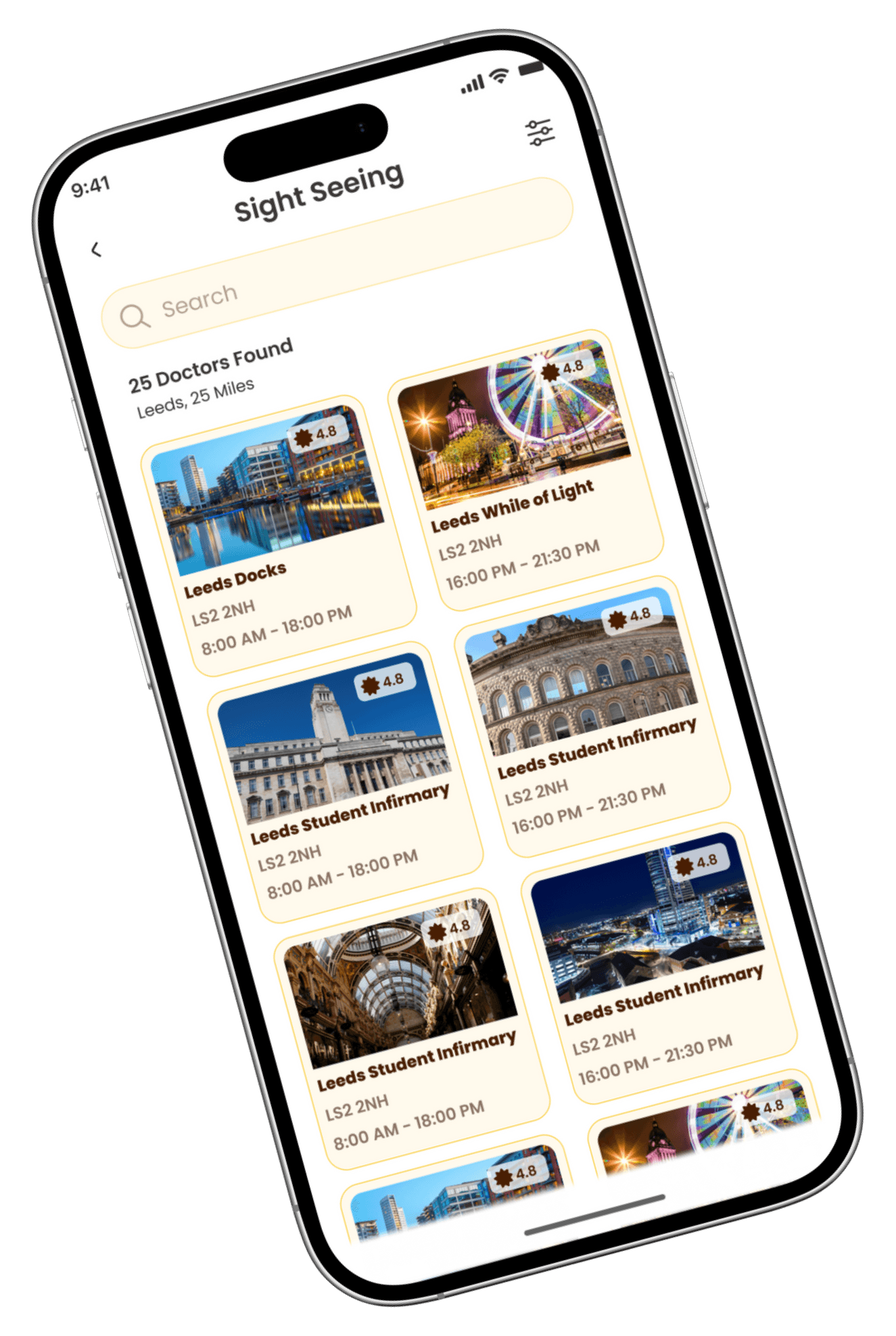
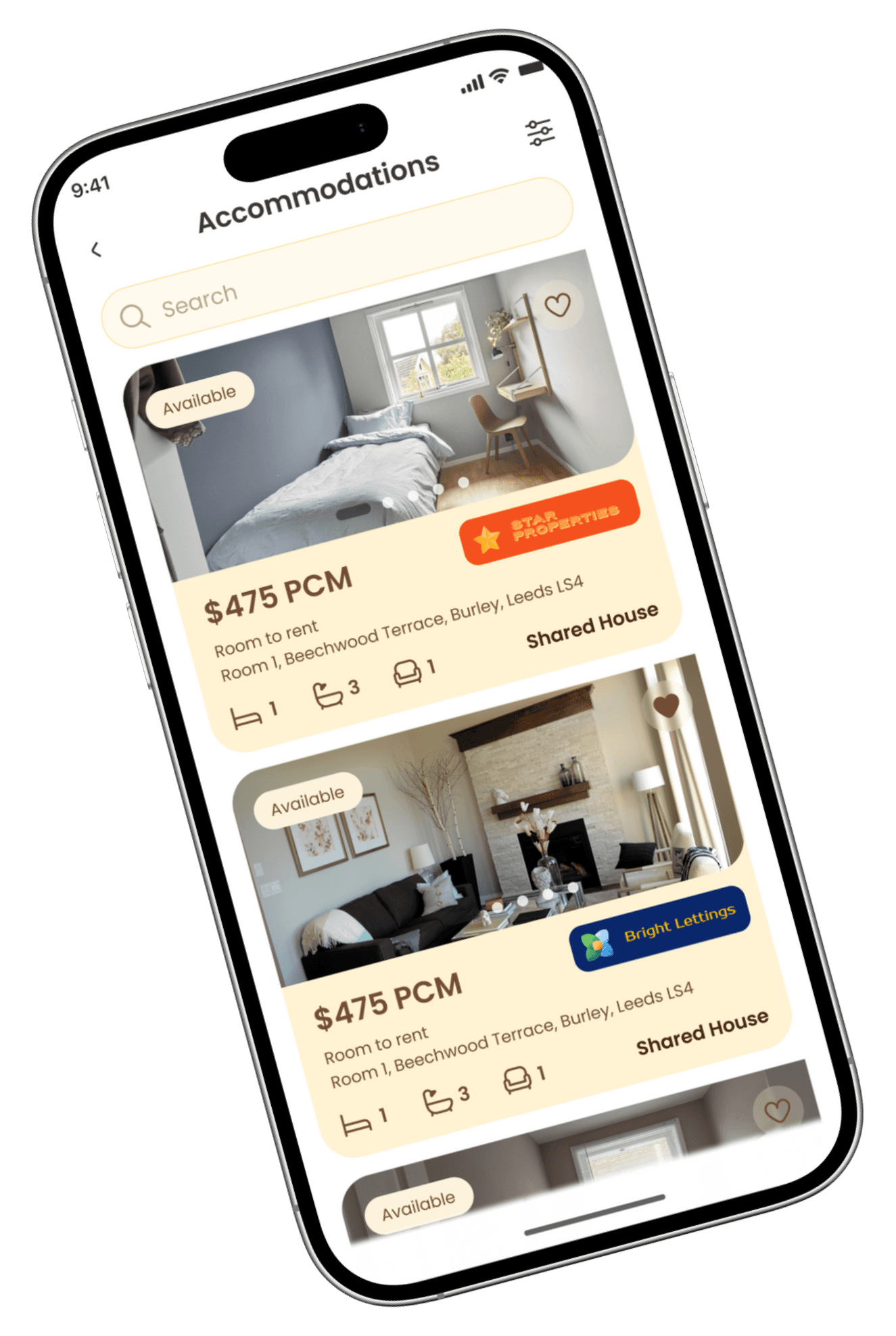
Designed with clarity in mind, the resource directory organizes vital information on housing, healthcare, schools, and transport into easily browsable sections. Clean layouts and iconography help users quickly find and bookmark the resources most relevant to their needs.
03
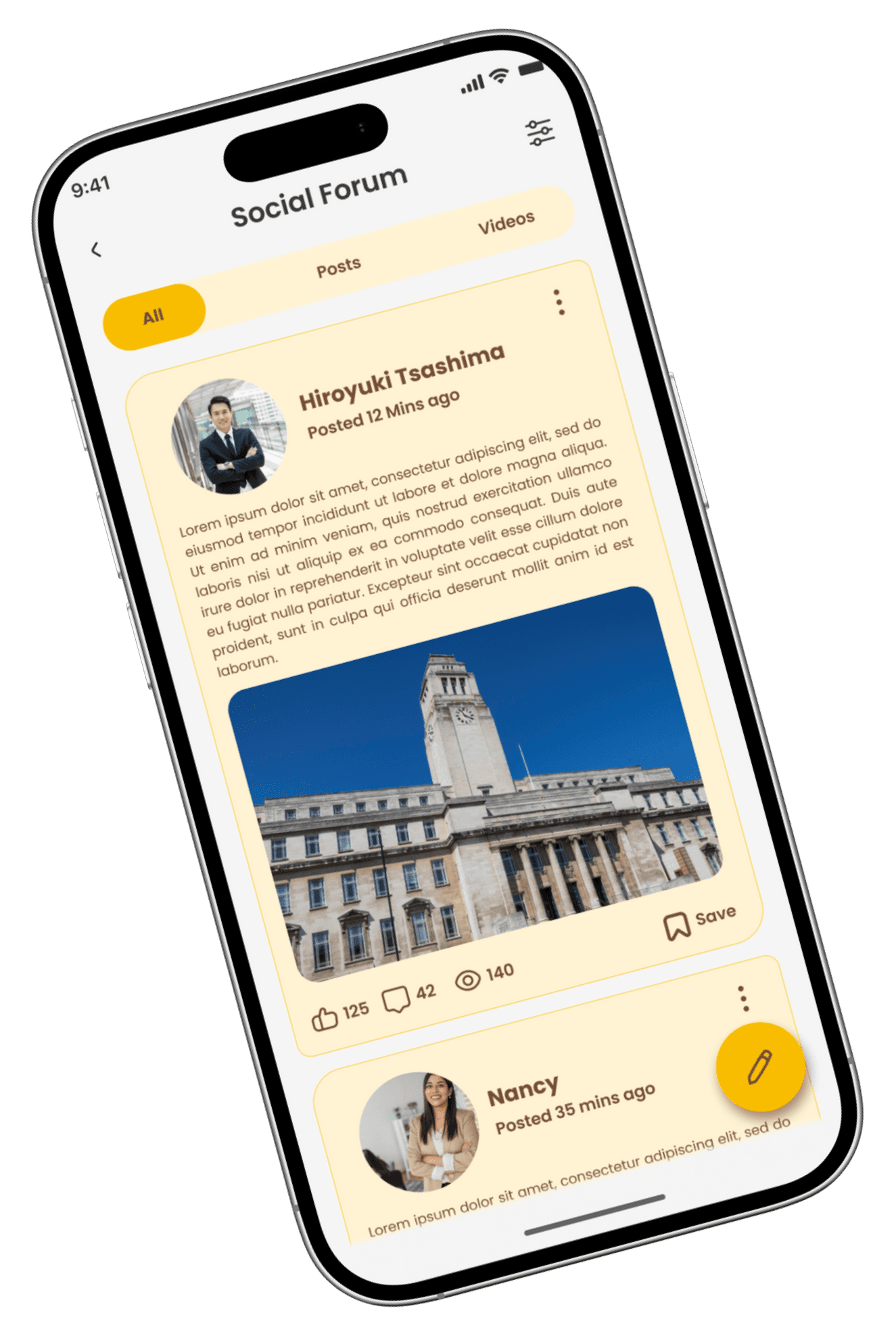
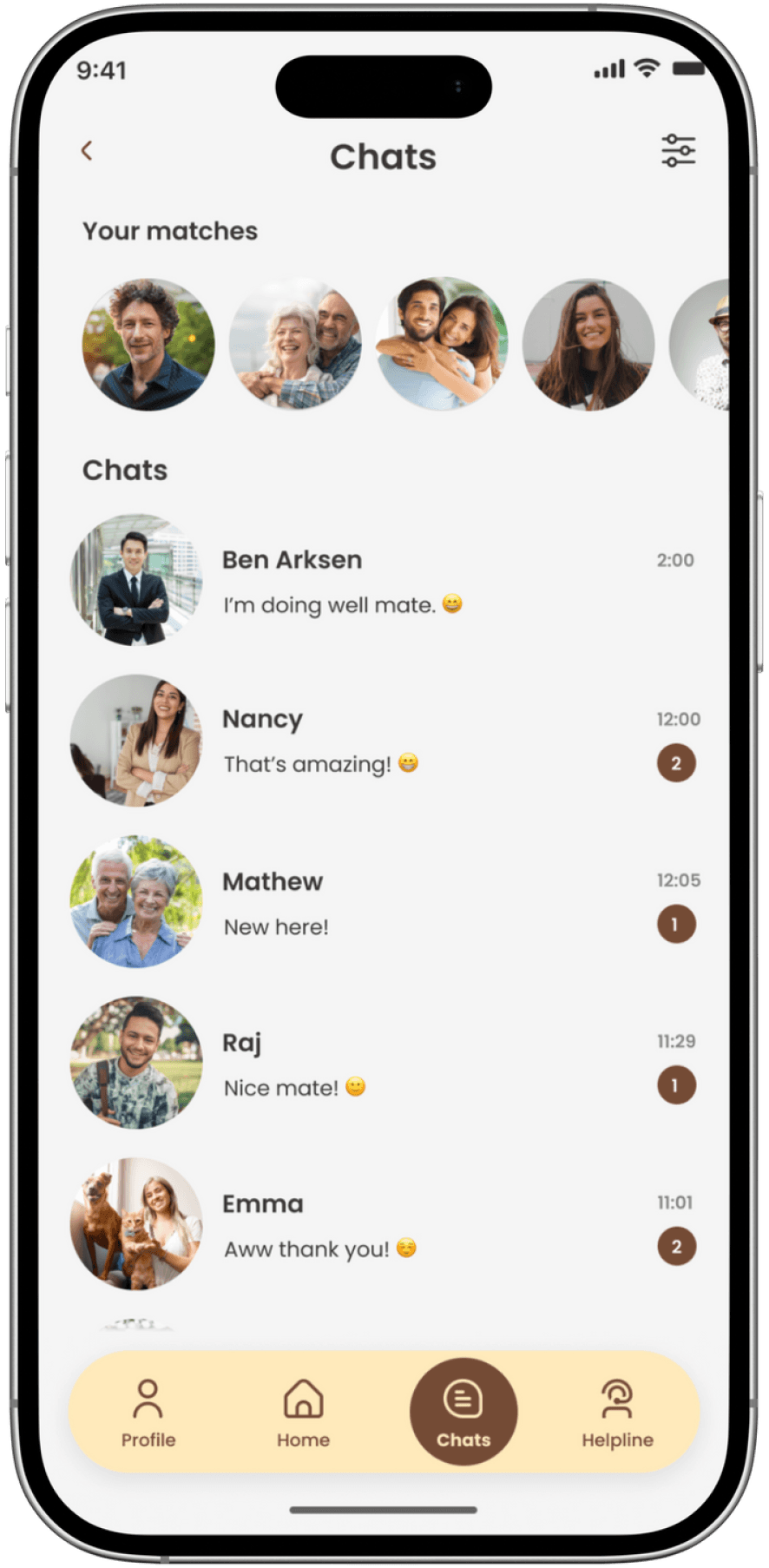
Community & Social Connections
The community and find friends sections foster a sense of belonging by connecting users with local groups, events, and peers who share similar backgrounds or interests. Friendly visuals and interactive elements encourage engagement and support.
04

Cash
Shopping
Expenses
Add a comment...
£55.75
1
2
3
6
5
4
7
8
9
0
,
£
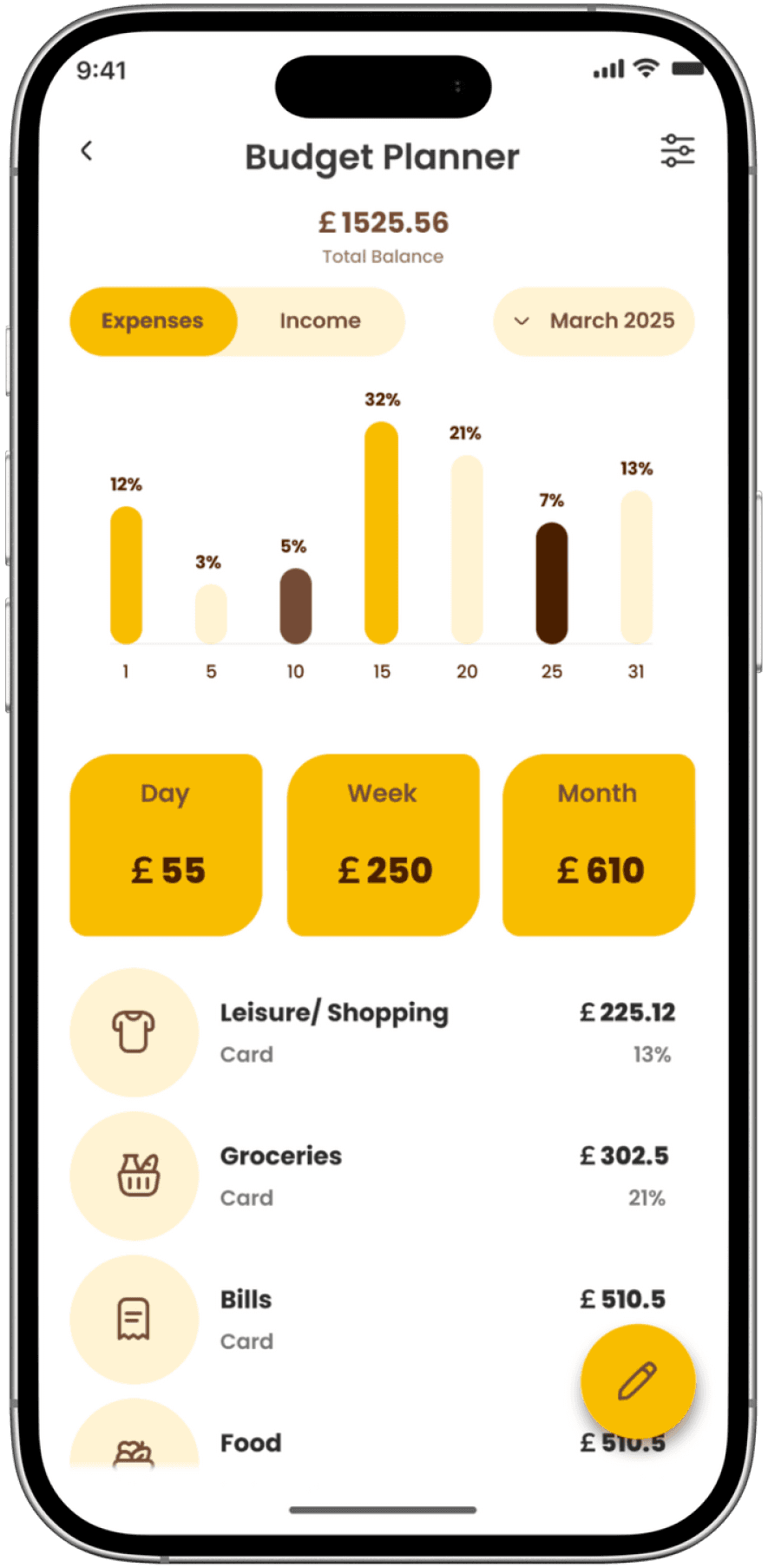
Budget Planner
The budget planner interface provides users with a clear overview of their expenses, helping them manage finances during their relocation. Visual charts and simple input fields make tracking spending and planning ahead both easy and visually appealing.
05
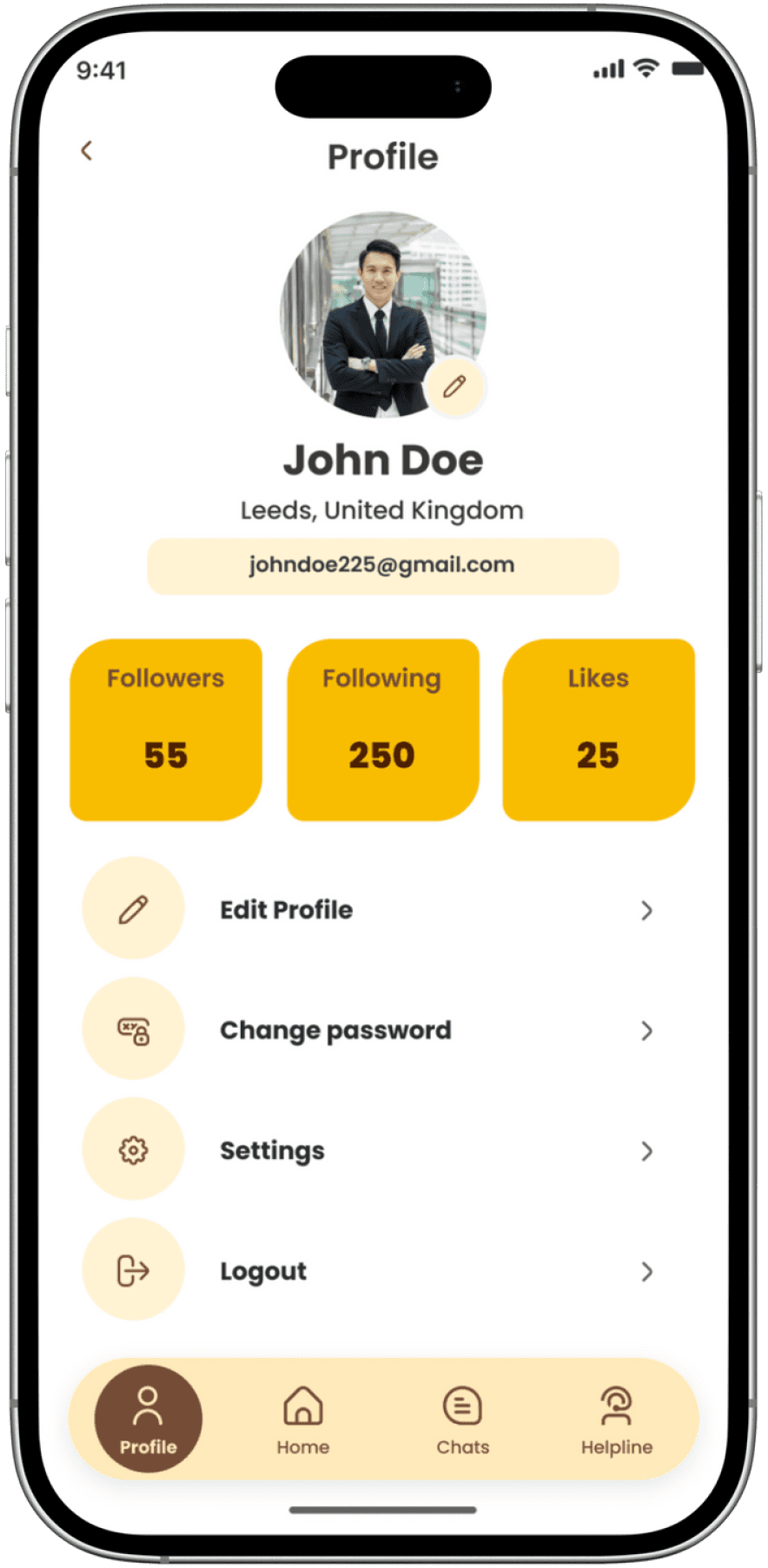
USER PROFILE
The user profile screen allows individuals to update personal details, manage preferences, and view their activity within the app. Consistent design elements and accessible settings ensure users can easily maintain and personalize their profiles.
06
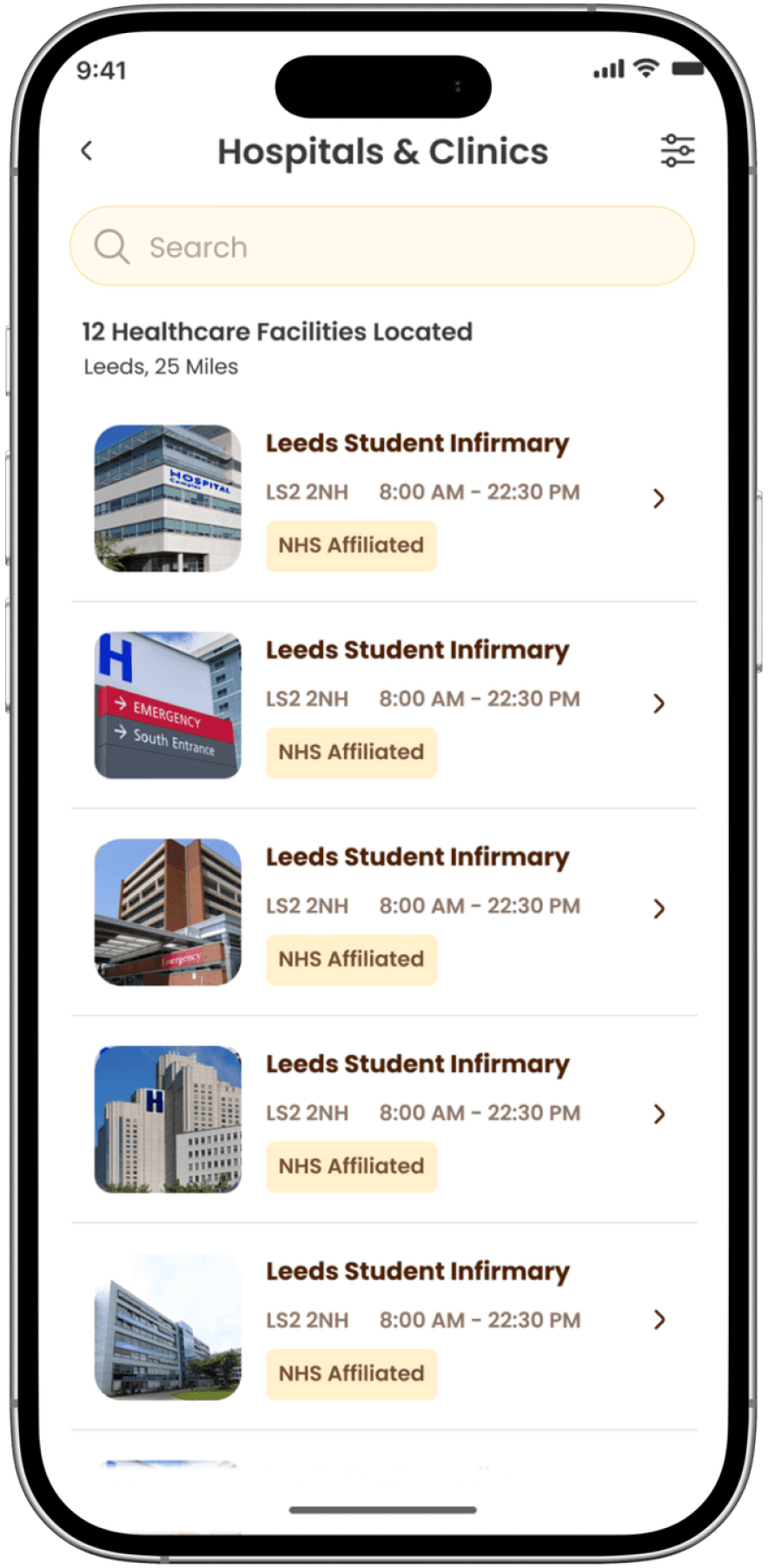
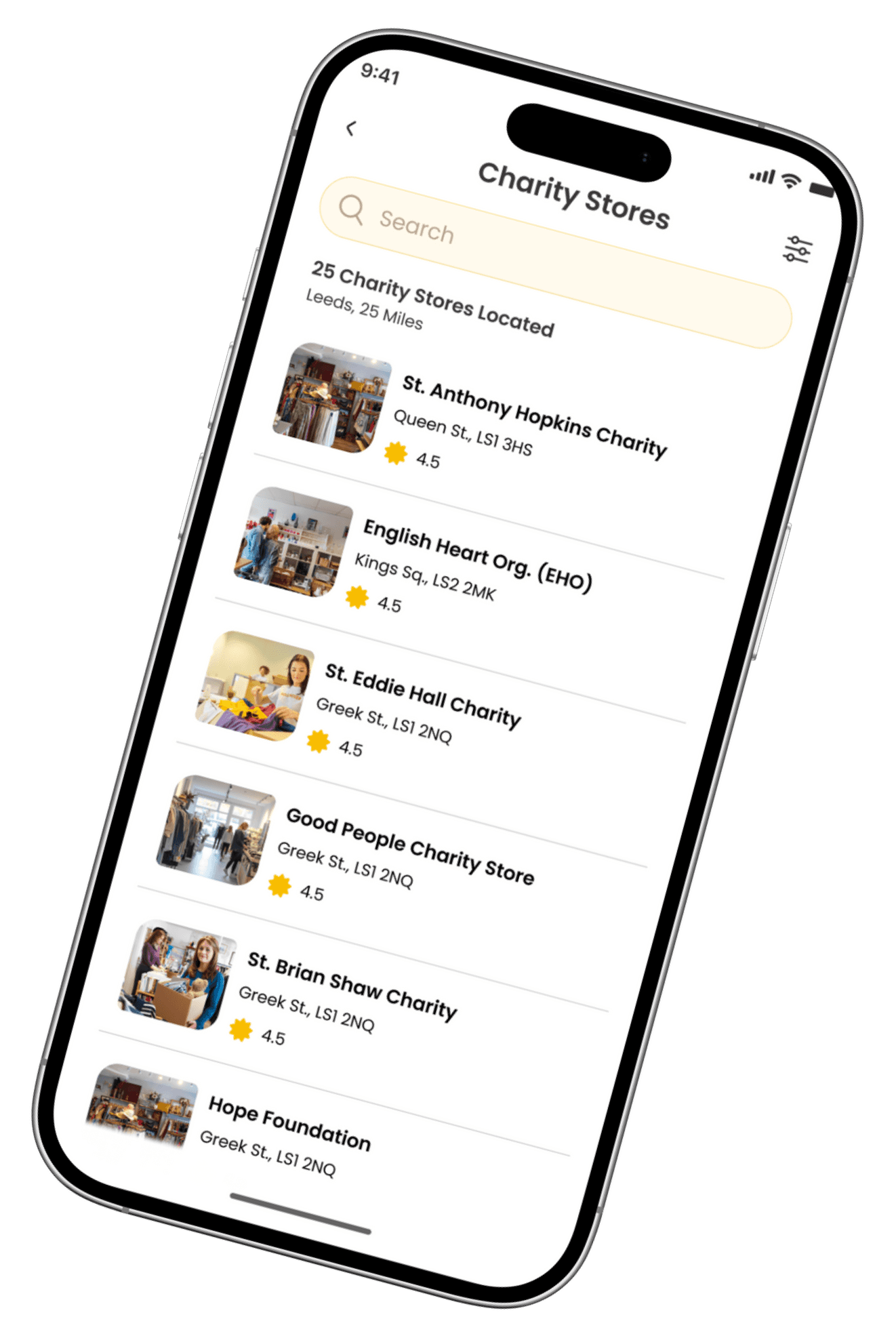
Essential Local Resources
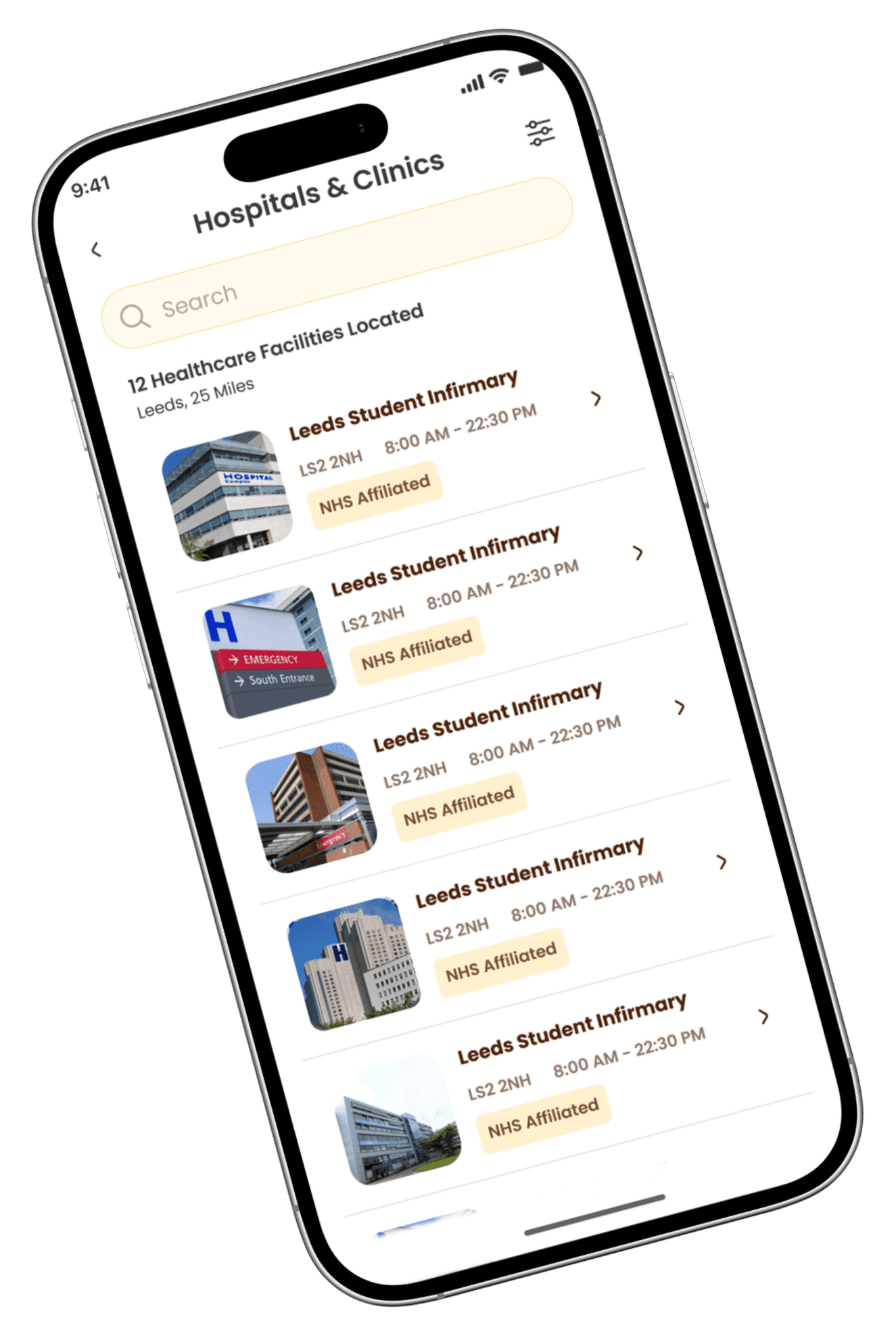
Hobnob’s dedicated list pages for charity stores and healthcare facilities provide users with curated, easy-to-browse information on essential local resources. Clean layouts and clear details make it simple for newcomers to quickly find nearby support services and medical care, helping them settle in with confidence and peace of mind.
07
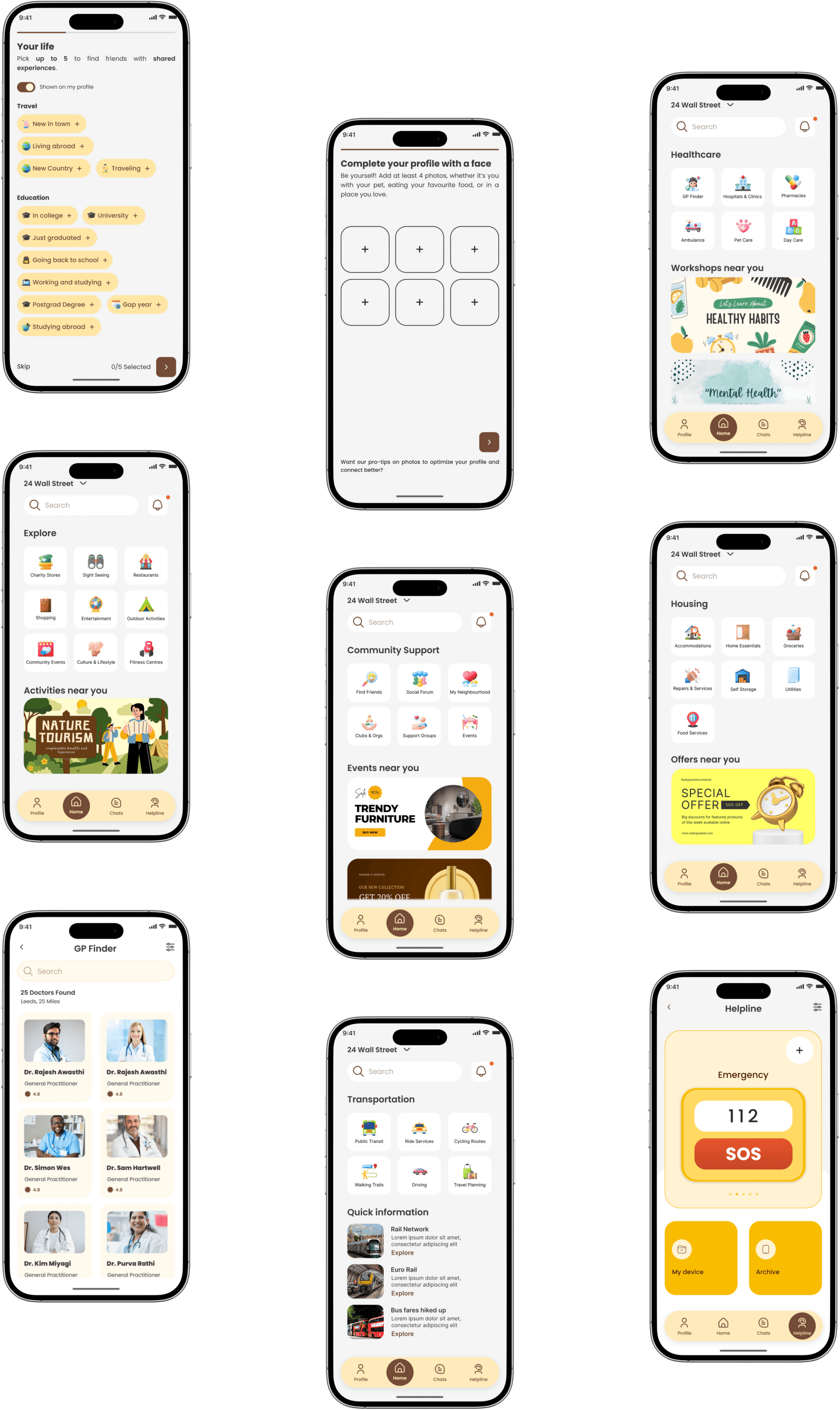
MAIN SCREENS & Main Categories
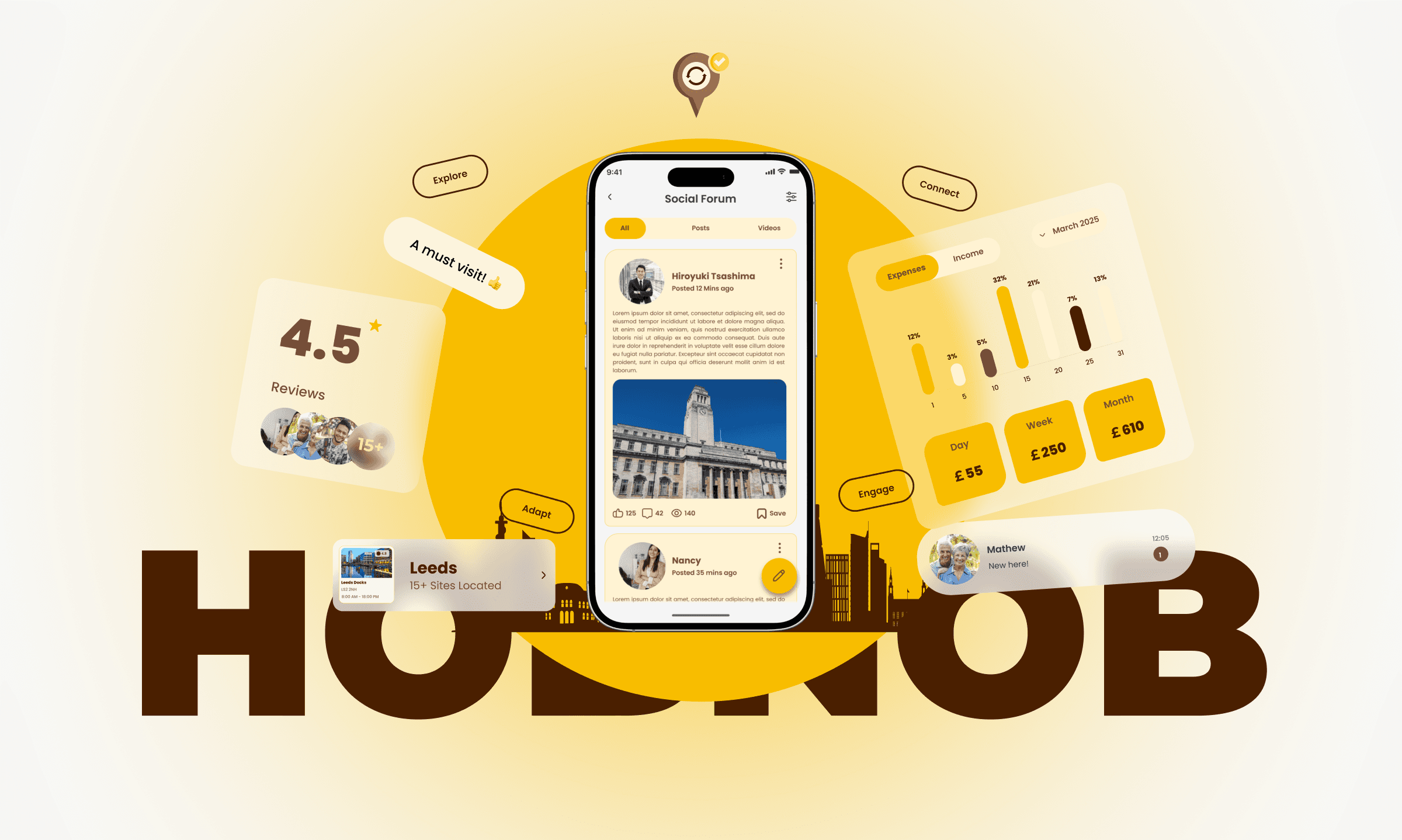
Hobnob’s main screens offer quick, user-friendly access to key categories like Community, Healthcare, Housing, Explore, Budgeting, and Transportation. Each section is designed for easy navigation and practical support, helping newcomers find resources, connect locally, and settle in with confidence.
08
Post-Research Enhancements
To ensure Hobnob delivers a seamless and supportive experience for newcomers, we followed a structured process of testing and refinement. By involving real users throughout development, we identified pain points, gathered actionable feedback, and continuously improved the app’s usability and effectiveness.
🧪️
💬
🔁️
The prototype was tested with users who matched our target audience. These sessions revealed navigation challenges, interface clarity issues, and other user experience problems that informed our design decisions.
User feedback was carefully analysed to enhance the design, address specific pain points, and improve overall usability—ensuring Hobnob truly meets the needs of its users.
I repeated the testing and improvement process multiple times, refining the app with each cycle. This iterative method allowed us to achieve an optimal, user-centred solution that supports newcomers at every step.
Usability tests
Feedback Collection
Iterative Approach
Conclusions
Hobnob is more than just an app—it’s a lifeline for those navigating the complexities of relocation. By addressing practical needs like housing and healthcare while fostering social connections through its community forum, Hobnob ensures that international students and relocated employees feel supported every step of the way.
With its structured approach, personalized recommendations, and innovative features like flash deals and friend-matching algorithms, Hobnob stands out as an essential tool for anyone embarking on this challenging yet exciting journey!
KEY FINDINGS
User-Centred Design Is Essential: Direct involvement of real users throughout the design and testing process revealed unique pain points and needs, ensuring the final product is truly tailored to those it serves.
01
Community Features Build Lasting Value: Integrating social tools like forums and friend-matching proved crucial for helping users feel connected and supported, especially in unfamiliar environments.
03
Simplicity Drives Engagement: Streamlining navigation and focusing on clear, intuitive interfaces made the app more approachable, reducing friction and encouraging frequent use.
02
Personalization Enhances the Experience: Offering tailored recommendations and relevant local deals significantly increased user satisfaction, demonstrating the power of personalization in fostering trust and loyalty.
04
vedant.khandelwal213@gmail.com
By Vedant Khandelwal
UX CASE STUDY 2025

Let's Create Together
Available for freelance projects, consulting opportunities, and full-time positions. Let's create accessible, data-driven digital experiences that make a real impact.
+44 7444148652 | +91 7303010238
© 2026 Vedant Khandelwal • UX Designer